
Pripravenosť na inštaláciu a dodanie PhotoRobot
Pripravte sa na inštaláciu vášho úplne nového systému PhotoRobot pomocou tohto sprievodcu pripravenosťou na inštaláciu a dodávku pre zákazníkov PhotoRobot. Nasledujúca dokumentácia má za cieľ pripraviť zákazníkov na inštaláciu ich automatizovaného fotografického systému, jeho dodávku a následné školenie. Pokrýva predpoklady pre inštaláciu systému, požiadavky na internetové pripojenie, sieťové predpoklady (LAN), napájanie strojov a prípravu podlahy miesta inštalácie. Potom nasleduje kompletný prehľad procesu dodávky zariadenia. To zahŕňa jeho prepravu na miesto určenia, manipuláciu so zariadením, vyzdvihnutie z továrne, poistenie, možné poškodenie počas prepravy a colné konanie a certifikáciu. Použite tohto sprievodcu na zabezpečenie pripravenosti na inštaláciu, pochopenie dodávky zariadenia a uľahčenie jeho plynulého následného školenia.
Poznámka: Pre úvod do systémovej integrácie pozri Systémovú integráciu a konektivitu API. Ak chcete preskočiť podrobnejšie k inštalačným a školiacim postupom, pozrite si Inštaláciu a školenie operátorov PhotoRobot Systems.
Predpoklady inštalácie pre systémy PhotoRobot
Pre bezproblémovú inštaláciu systému a následné školenie by si zákazníci mali pripraviť miesto inštalácie vopred. Je to nevyhnutné na zabezpečenie technickej možnosti inštalácie a jej optimálneho priebehu.
Zatiaľ čo tím PhotoRobot je ochotný pomôcť odstrániť akékoľvek chyby, čas, ktorý tým strávime, znižuje objem školenia. To, alebo v extrémnych prípadoch, to môže viesť k úplnému zrušeniu inštalácie. Preto je absolútne kľúčové venovať náležitú pozornosť predpokladom inštalácie.
Ak je pre zákazníka niečo príliš zložité, špecialisti PhotoRobot s radosťou poskytnú potrebnú spoluprácu. Zákazník by si však mal túto možnosť objednať v dostatočnom predstihu, aby nebol ohrozený samotný proces inštalácie. Preto je vhodné vopred si dôkladne skontrolovať všetky detaily a potvrdiť, že ste plne pripravení na inštaláciu.
Stroje sú navrhnuté na inštaláciu v priemyselných podmienkach, ako sú skladové haly a sklady. To umožňuje, aby bolo robotizované štúdio čo najbližšie k objektom na fotografovanie. Nie je však problém nainštalovať systémy PhotoRobot priamo do vášho fotografického štúdia alebo podobného typu priestoru.
Požiadavky na internetové pripojenie
Kvalita vášho internetového pripojenia má priamy vplyv na rýchlosť celého procesu snímania produktovej fotografie s PhotoRobot. Je to spôsobené automatickým nahrávaním nasnímaných obrázkov do cloudového úložiska a zálohy PhotoRobot, ktoré prebieha ihneď po stiahnutí obrázkov z fotoaparátu. Zároveň sa všetky úpravy vykonávajú na kópiách obrázkov, čo umožňuje kedykoľvek po postprodukcii vrátiť sa do ich pôvodného stavu.
Napríklad na linke 200 Mbps sa posledný snímok sekvencie zaznamená niekoľko sekúnd po zachytení posledného snímku. Preto sa pre nastavenie troch počiatočných pracovných staníc a ich následný vývoj projektu odporúča linka 100 Mbps. Pre produkčné záťaže si všimnite, že neodporúčame pripojenie nižšie ako 20 Mbps, pričom preferovaná je šírka pásma aspoň 50 Mbps.
Poznámka: PhotoRobot Cloud používa nástroje Google. To znamená, že pre krajiny, kde existujú obmedzenia služieb Google (napr. Čína), je potrebné vopred overiť funkčnosť. PhotoRobot nezodpovedá za žiadne budúce zmeny v rozsahu takýchto obmedzení. Na zabezpečenie očakávanej kvality služby sa odporúča nastaviť VPN.
Sieťové predpoklady (LAN)
Počítačová sieť musí spĺňať potrebné parametre podľa predpokladov siete PhotoRobot. Ak poskytovateľ pripojenia alebo správca siete na strane spoločnosti nedokáže splniť tieto predpoklady, sieťový špecialista PhotoRobot môže zabezpečiť konfiguráciu. Alebo môžu poskytnúť potrebné sieťové prvky, ktoré budú vhodne nakonfigurované, čím sa zabezpečí plná funkčnosť (čo je preferovaná možnosť). V takýchto prípadoch sú parametre výrazne jednoduchšie.
Potom, na zabezpečenie plnej funkčnosti všetkých zariadení, je potrebné káblové aj Wi-Fi pripojenie. Bezdrôtové pripojenie sa používa napríklad na ovládanie svetiel Broncolor, aplikácie PhotoRobot Locator atď. Pre viac podrobností a technických informácií o konfigurácii počítača a siete si pozrite PhotoRobot Systémové požiadavky.
Napájanie strojov
Dizajn zariadení PhotoRobot je pre napájanie 115V aj 230V. Niektoré modely majú manuálny volič napájania. Iné sa prepínajú automaticky. Pred pripojením k sieti sa vždy uistite, že nastavenia sú správne (a skontrolujte typový štítok, kde je to uvedené).
Ďalej, pre zabezpečenie bezproblémovej prevádzky, odporúčame používať prepäťovú ochranu a prípadne záložné zdroje energie na elimináciu kolísania napätia. Súvisiace problémy, ako sú tieto, sa vyskytujú hlavne vo vidieckych oblastiach, ale aj v priemyselných budovách.
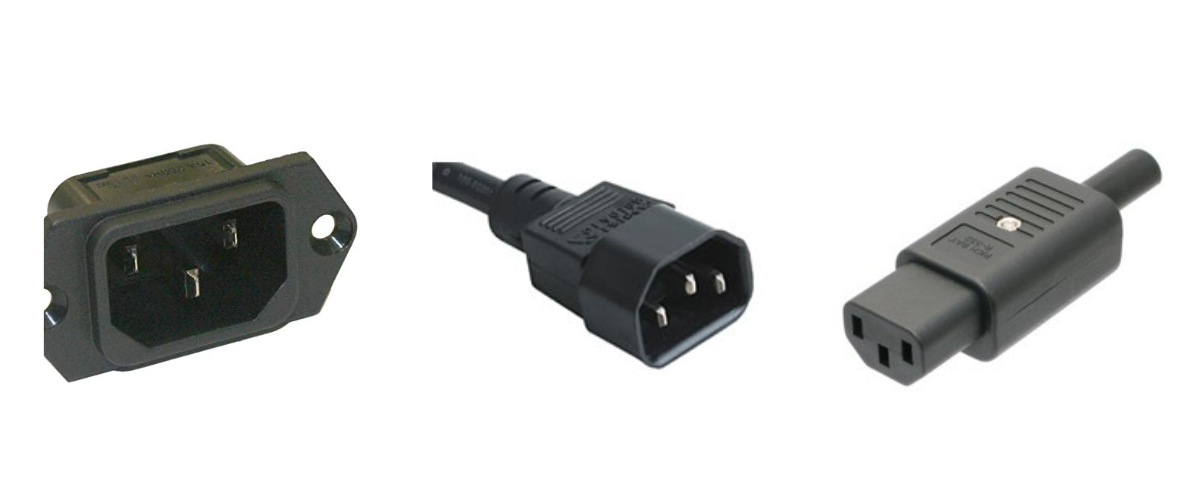
Stroje používajú káble s konektormi, ktoré zodpovedajú norme IEC 60320 C13 / C14. To platí pre prepojenie viacerých strojov v rámci jedného pracoviska, ako aj pre pripojenie celého pracoviska k elektrickej sieti. Prepojovacie káble na mieste sú súčasťou dodávky, ale koncový kábel (podľa miestnych elektrických noriem) je dodávaný zákazníkom (pokiaľ nie je vopred dohodnuté inak).
Nakoniec, pri plánovaní distribúcie energie v štúdiu je potrebné zvážiť spotrebu energie celého systému (roboty vrátane svetiel a počítačov). To platí najmä v prípadoch inštalácie viacerých strojov v štúdiu, kedy by ste mali zvážiť rovnomerne rozložené zaťaženie vo všetkých fázach.
Podlaha miesta inštalácie
Pre inštaláciu väčšiny robotov je vhodná pevná tvrdá podlaha podľa bežných štandardov. Mäkké podlahové krytiny (plasty a najmä koberce) znižujú presnosť a dynamiku systému v dôsledku mierneho pohybu strojov umiestnených na nich.
Flexibilné podlahy (napr. dosky) nie sú vhodné na mieste inštalácie. Pokiaľ neexistuje iná alternatíva umiestnenia strojov, odporúča sa nainštalovať aspoň vhodnú dosku na rozloženie hmotnosti (drevotrieska, preglejka atď.).
PhotoRobot Carousel machines stroje určené na zapustenú inštaláciu sú dodávané s technickými špecifikáciami zloženia podlahy, ktoré zákazník prediskutuje so špecialistom PhotoRobot pred začatím výstavby.
Dodanie zariadenia PhotoRobot
Na uľahčenie ľahkej dodávky je potrebné pripraviť sa nielen na samotnú prepravu, ale aj na vykládku na mieste inštalácie. To zahŕňa prípravu na bezpečné uskladnenie strojov pred príchodom inštalačného tímu, pričom sa zohľadňuje aj dostupnosť manipulačného zariadenia, rozmery dverí, schodísk alebo výťahov atď.
Preto sa vždy odporúča vopred konzultovať s tímom PhotoRobot výber vhodného miesta inštalácie. V praxi sa niekedy stretávame s nedostatočnou výškou stropov, úzkymi prístupovými dverami do miestností a nedostatočnou kapacitou elektrickej infraštruktúry alebo počítačových sietí. Môže chýbať dostatočné osvetlenie, vetranie alebo priestor na manipuláciu s tokom fotografovaných objektov. V týchto prípadoch je následné premiestnenie zariadenia samozrejme možné, ale dôkladná konzultácia vopred vedie k oveľa plynulejším inštaláciám.
Preprava systému na miesto určenia
Po schválení nákladov na dopravu, ktoré PhotoRobot oznámi pred potvrdením objednávky, dodáme riešenie PhotoRobot na dohodnuté miesto. Pre maximálnu presnosť ponúkanej ceny vždy vyžiadame cenovú ponuku dopravy pre konkrétnu objednávku. Príprava cenovej ponuky dopravcom zvyčajne trvá 2 – 3 pracovné dni.
Potom starostlivo zabalíme všetko vybavenie a komponenty a spolupracujeme s viacerými etablovanými logistickými spoločnosťami (DB Schenker, TNT atď.), aby sme zabezpečili, že objednávky dorazia na miesto určenia neporušené a v požadovanom čase. Či už po ceste, mori alebo vzduchom, PhotoRobot je k vám dodaný a poistený, ako aj vhodne označený pre čo najhladšiu prepravu.
Na zaistenie bezpečnosti strojov počas prepravy odporúčame nasledovné.
- Pre samostatné prepravy (t.j. stroje sú prepravované medzi továrňou a miestom inštalácie s prekládkou v sklade), špeciálne balenie v odolných drevených prepravkách nie je potrebné. Samostatné prepravy zahŕňajú: prepravu dodávkou alebo kamiónom / FCL kontajner (zapečatený v továrni a odpečatený v mieste inštalácie, kde sú stroje pevne ukotvené v kontajneri). Poznámka: Zákazník musí zabezpečiť parkovanie pre nákladné vozidlá (ak majú zostať na mieste v čase inštalácie).
- Pre LCL alebo letecké zásielky je potrebné špeciálne balenie (účtované samostatne podľa konkrétnej objednávky), aby sa tovar počas prepravy nepoškodil.
V mnohých prípadoch je z hľadiska celkových nákladov nákladovo efektívnejšie zvoliť samostatnú zásielku namiesto LCL alebo leteckých zásielok.
Okrem toho, vo vzdialenosti približne 1000 km od továrne môže byť výhodné použiť dodávkové vozidlo PhotoRobot. Dodávkové vozidlo PhotoRobot tiež privezie montážny tím spolu s dodávkou.
Po odoslaní potom informujeme zákazníka, že jeho nový systém PhotoRobot je na ceste.
Manipulačné zariadenia
V štandardných situáciách nie je potrebné vozidlo s hydraulickým zdvihákom. Ak však na mieste vykládky nie je rampa alebo vhodné vybavenie (vysokozdvižný vozík atď.), zákazník by si ho mal vyžiadať. Zákazník by to mal tiež špecifikovať samostatne a vopred pred akoukoľvek inštaláciou.
Odber v továrni (EXW)
Po predchádzajúcej dohode si zákazník môže tovar vyzdvihnúť priamo prostredníctvom svojho prepravcu v našom expedičnom sklade, alebo prevziať v nakladacom / vykladacom prístave.
Poznámka: Môže byť vhodné skombinovať osobný odber so školením priamo u výrobcu (ako platená služba – pozrite si Inštalácia a školenie PhotoRobot pre viac informácií).
PhotoRobot má k dispozícii všetky štandardné manipulačné zariadenia na mieste nakládky (vysokozdvižné vozíky, rampy, železnica atď.).
Poistenie a možné poškodenie počas prepravy
Dodávka strojov, ktoré PhotoRobot poskytuje, vždy zahŕňa poistenie proti bežným rizikám. Ak prepravu zabezpečuje zákazník, odporúčame aj príslušné poistenie.
V každom prípade odporúčame prediskutovať úplnosť dodávky vrátane akýchkoľvek poškodení s doručujúcim prepravcom ihneď po prevzatí zásielky. Je to preto, aby sa predišlo akýmkoľvek možným sporom neskôr.
Colné a certifikačné požiadavky
Ak existujú špeciálne colné postupy v krajine príjemcu, zákazník musí o tom vopred informovať dodávateľa. Je to nevyhnutné na zabezpečenie plynulého dodania zariadenia na miesto určenia zákazníka.
Podobná situácia nastáva, keď krajina príjemcu vyžaduje špeciálne certifikáty pre dovážaný tovar (t.j. neakceptuje normy CE).
V oboch prípadoch odporúčame odložiť akékoľvek plánovanie cesty pre inštalačný a školiaci tím, kým zásielka nedorazí na miesto určenia. To, alebo keď nie sú absolútne žiadne pochybnosti o včasnom dodaní zariadenia. Poznámka: Je zodpovednosťou zákazníka dodržiavať tento bod a akékoľvek súvisiace komplikácie.
Inštalácia vášho systému PhotoRobot
Po dodaní náš tím skúsených technikov PhotoRobot nainštaluje vaše úplne nové riešenie PhotoRobot. Technici zabezpečia správnu montáž a nastavenie vášho systému, ako aj jeho správnu funkčnosť, aby ste mohli PhotoRobot využiť naplno. Podrobné informácie o inštalácii a následnom školení vášho systému nájdete v sekcii PhotoRobot Installation and Operator Training.


Séria EOS Rebel


Séria digitálnych zrkadloviek EOS


Séria bezzrkadlových fotoaparátov EOS M


Séria PowerShot


Detailný záber / Ručný záber

Séria Canon EOS Rebel ponúka digitálne zrkadlovky vhodné pre začiatočníkov so solídnou kvalitou obrazu, intuitívnym ovládaním a všestrannými funkciami. Tieto fotoaparáty sú ideálne pre fotografických nadšencov a poskytujú spoľahlivé automatické zaostrovanie, výklopné dotykové obrazovky a nahrávanie videa vo Full HD alebo 4K.
Pripojenie
Rozlíšenie (MP)
Rezolúcia
Séria digitálnych zrkadloviek Canon EOS poskytuje vysokokvalitné snímky, rýchle automatické zaostrovanie a všestrannosť, vďaka čomu je ideálna na fotografovanie aj produkciu videa.
Pripojenie
Rozlíšenie (MP)
Rezolúcia
Séria Canon EOS M Mirrorless kombinuje kompaktný dizajn s výkonom podobným digitálnej zrkadlovke. Vďaka vymeniteľným objektívom, rýchlemu automatickému zaostrovaniu a vysokokvalitným obrazovým snímačom sú tieto fotoaparáty skvelé pre cestovateľov a tvorcov obsahu, ktorí hľadajú prenosnosť bez obetovania kvality obrazu.
Pripojenie
Rozlíšenie (MP)
Rezolúcia
Séria Canon PowerShot ponúka kompaktné a užívateľsky prívetivé fotoaparáty pre príležitostných strelcov a nadšencov. S modelmi od jednoduchých point-and-shoot až po pokročilé fotoaparáty so zoomom poskytujú pohodlie, solídnu kvalitu obrazu a funkcie, ako je stabilizácia obrazu a 4K video.
Pripojenie
Rozlíšenie (MP)
Rezolúcia
Fotoaparáty Canon na detailné zábery a ručné fotoaparáty sú určené na detailné fotografovanie a natáčanie videí zblízka. Sú kompaktné a ľahko použiteľné, ponúkajú presné zaostrovanie, zobrazovanie vo vysokom rozlíšení a všestranné možnosti makro – ideálne na vlogovanie, produktovú fotografiu a kreatívne zábery zblízka.


